Three platforms at once
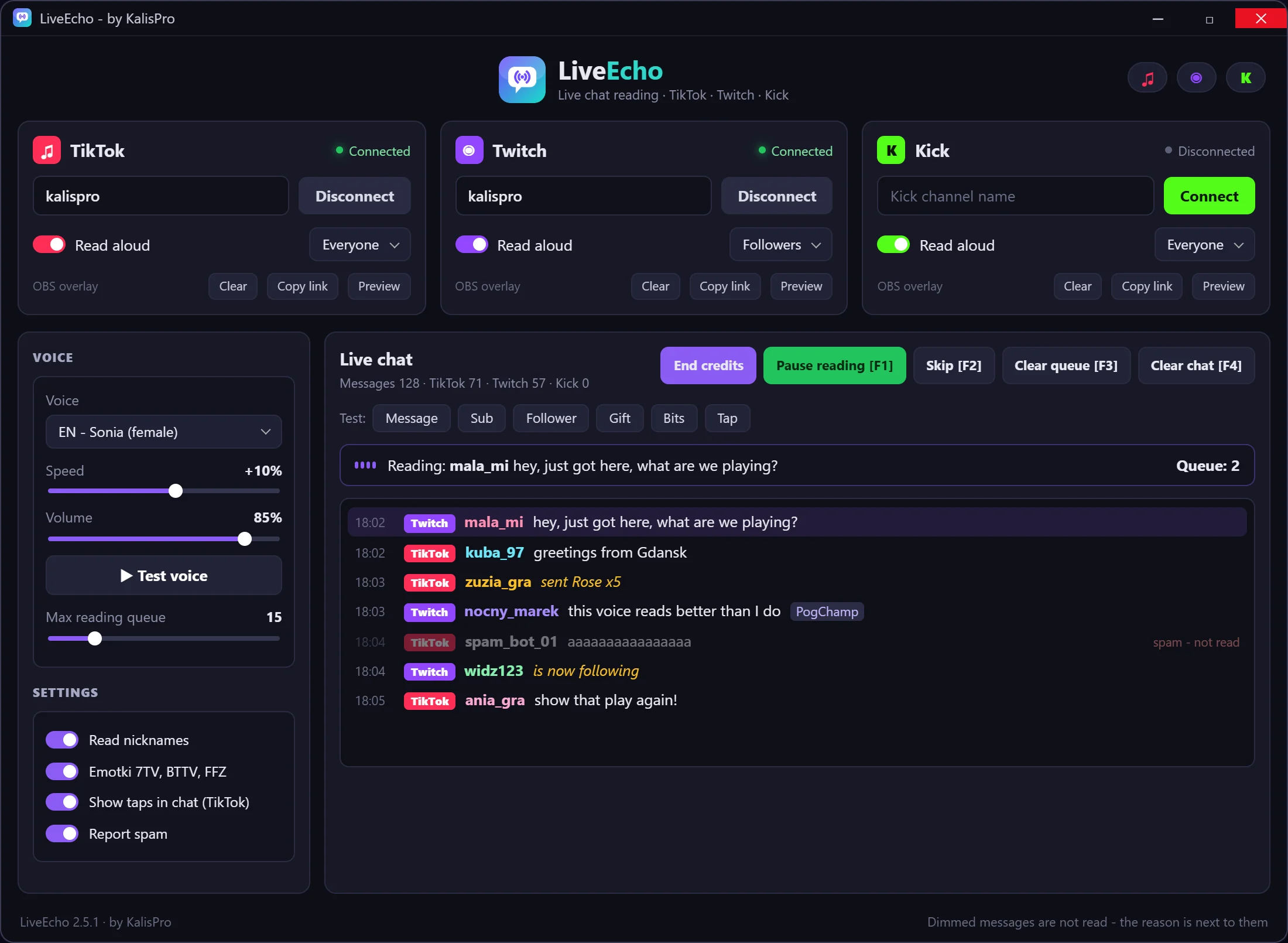
Chat from TikTok, Twitch and Kick in one window, with a platform icon on every message. The app checks whether the channel is live and tells you plainly when it is not.
- TikTok
- Twitch
- Kick
LiveEcho reads messages from TikTok, Twitch and Kick as they arrive, so you hear your viewers without watching the chat. Plus a stream overlay, end credits and emotes.
A single file, no installation and no Python needed.
File: LiveEcho.exe, version 2.5.3, 36.7 MB, Windows 10/11. Author: KalisPro. SHA-256: 33761e35a8ddab44d1148bcb93b1fc23cf9c87463700ed943ffa1589685842cf
mala_mi
hey, just got here, what are we playing?
kuba_97
greetings from Gdansk
nocny_marek
this voice reads better than I do lol
zuzia_gra
show that play again!
Click a tab to see a screen of the app. Screenshots of the real app, with sample data.
 LiveEcho - by KalisPro
A reader, an overlay and stream extras in one app. You turn each part on and set it up separately.
Chat from TikTok, Twitch and Kick in one window, with a platform icon on every message. The app checks whether the channel is live and tells you plainly when it is not.
Everyone, followers, subscribers or moderators, set separately for each platform.
Chat on your broadcast as a browser source: 12 message entrance animations, effects, nick colours by platform and badges.
Pick the voice, speed and volume. Separate audio devices for the stream and for you, so you decide whether viewers hear the chat being read.
Viewers request YouTube songs with !play and skip them with !skip. You choose who can request, and set the length limit, the limit per person and the volume. Music plays in a separate OBS source through the official YouTube player.
When a moderator removes a message or gives a ban or timeout, the message disappears from the overlay, is crossed out in the app, and the voice does not read it.
A big confetti card when someone subs, sends a gift, bits, kicks or raids. Kick follows too: the counter works on its own, and with DogByte you see usernames.
One code links LiveEcho with the Discord bot: the next stream in the credits, faster LIVE alerts, a stream recap and Kick follows with usernames.
A pixel-art German Shepherd runs along the bottom of the screen. She greets new people, gets happy about follows, subs and raids, does tricks on chat commands, and on !fetch a little person with the viewer's name comes and throws her a stick. When chat is quiet she plays on her own and finally falls asleep on her bed.
Global and channel emotes, in the app window and on the overlay. They refresh during the stream.
At the end of the stream credits roll with your viewers, subscribers, followers and gifts, with music behind them.
An animated panel with your channels and real platform logos. List, grid or carousel layout, and it can show and hide by itself.
A TikTok like ranking with viewer avatars and a larger top 3.
Add a word once and the app blocks it in every form: with spaces, dots, repeated letters and digits in place of letters.
Global hotkeys: pause reading, skip a message, clear the queue. They work while you are in a game too.
On startup the app checks for a new version and can update itself.
Chat is processed on your own computer. LiveEcho does not collect data or send it to the author.
LiveEcho is not code-signed yet, so on first run Windows SmartScreen may warn about an unknown publisher. The SHA-256 checksum of the file is listed next to the download button.
Short walkthroughs to get everything set up in a few minutes.
Yes. No activation codes, no subscription and no time limits.
TikTok, Twitch and Kick, all at once if you like. You type in a channel name and each message shows its platform icon.
Yes. The overlay is a browser source, so it works in OBS, Streamlabs and XSplit. The app gives you a ready link to paste.
No. LiveEcho is a single Windows file that runs straight after download.
The app does not have a paid code-signing certificate yet, so Windows SmartScreen does not recognise it and warns about an unknown publisher. Code signing is planned. Until then you can compare the SHA-256 checksum of the downloaded file with the one shown next to the download button.
No. You choose separate audio devices for the stream and for yourself, so the voice can go out on the broadcast or only to your headphones.
Yes. For each platform you choose whether to read everyone, followers, subscribers or moderators. You can also ignore specific people.
Chat is processed on your own computer. LiveEcho does not collect data or send it to the author. Text to be read goes to the Microsoft Edge voice service, which turns it into speech.
Yes. Kick chat does not report follows, so LiveEcho watches the follower count and shows an alert when it goes up. It knows the usernames of viewers who wrote in chat right away. All usernames come from the DogByte bot connection (your Kick channel connected in its Chat bot section).
No codes and no subscription. If the app helps you, you can buy me a coffee.